 flowmance
JulianVoss Design System
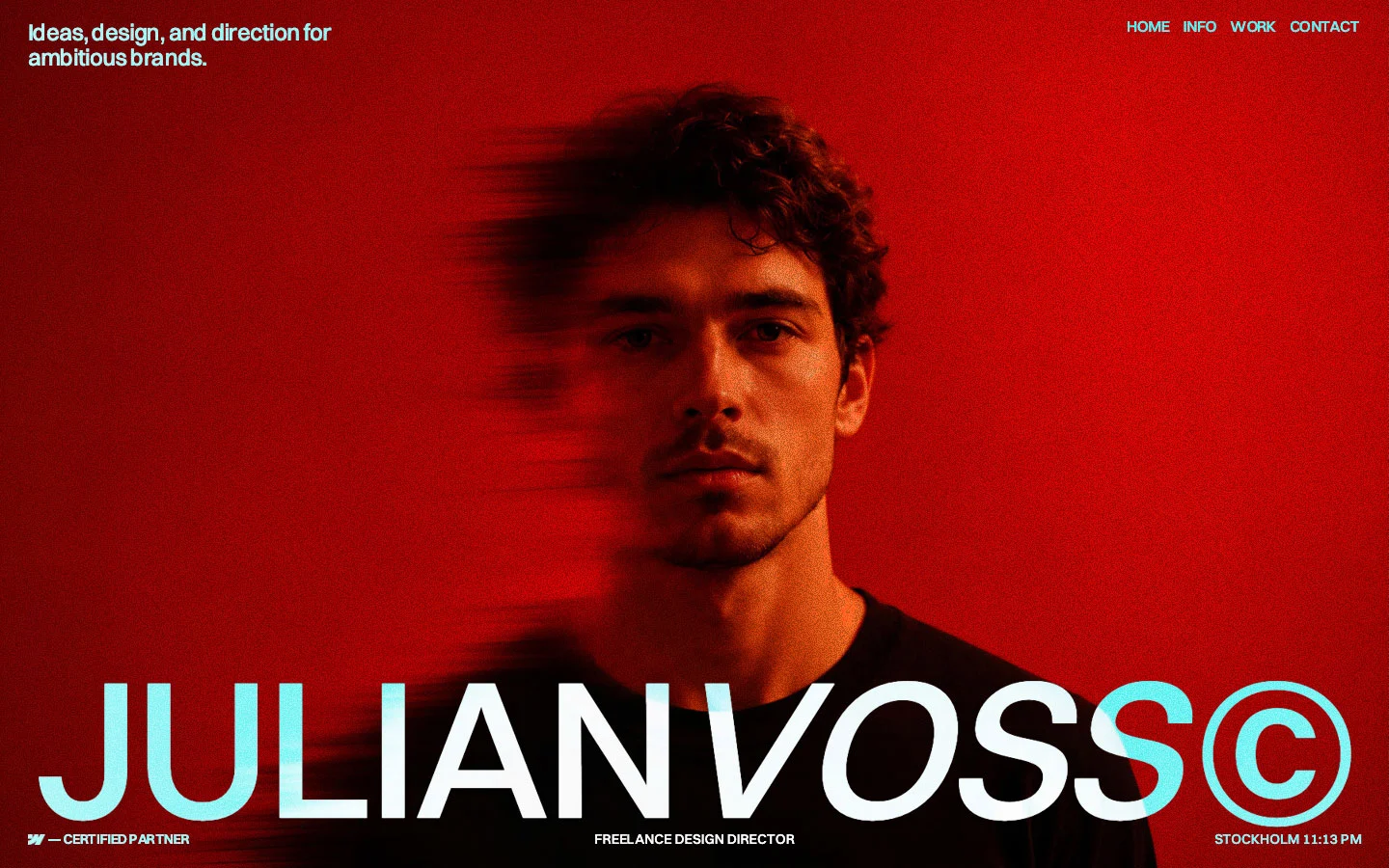
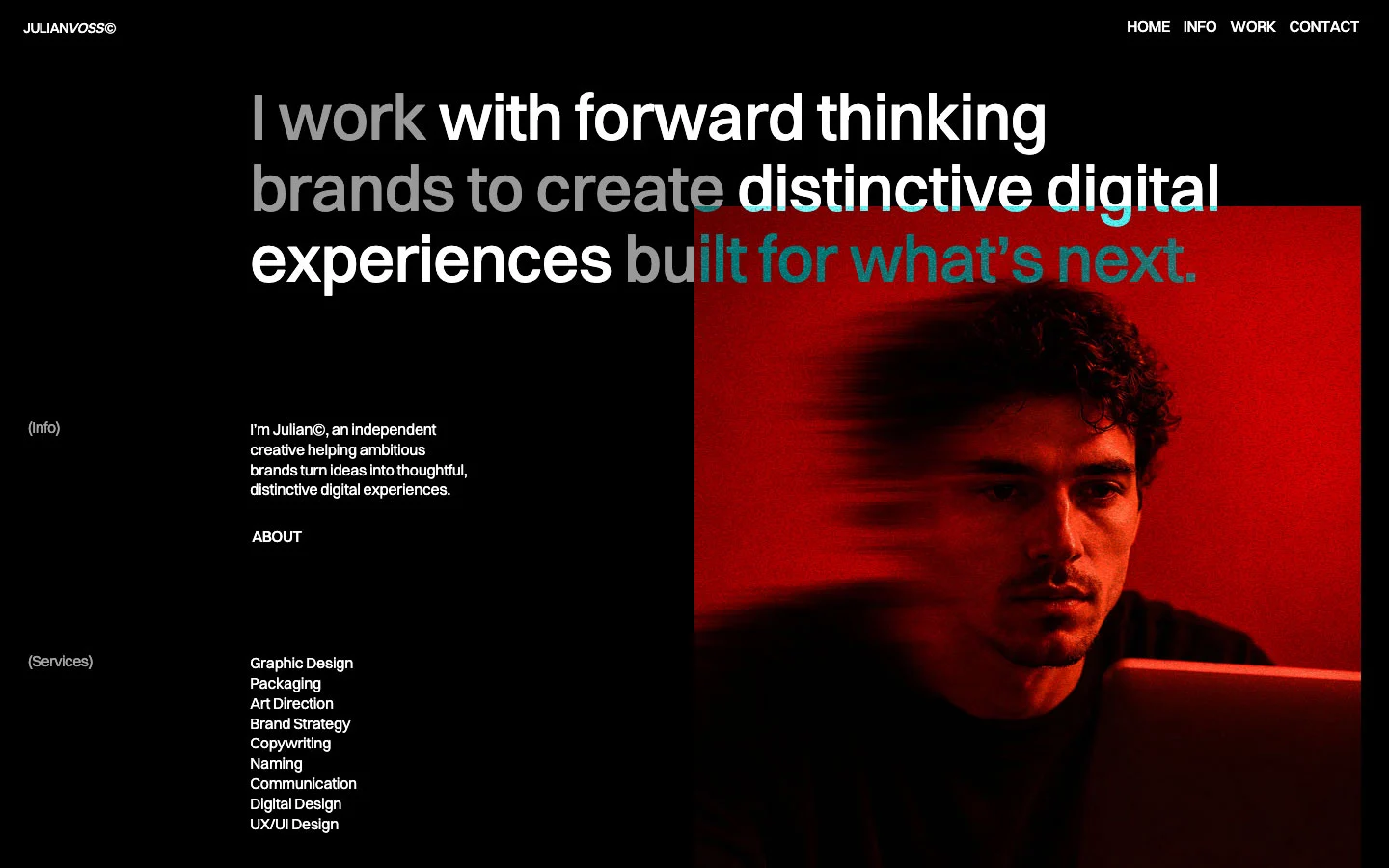
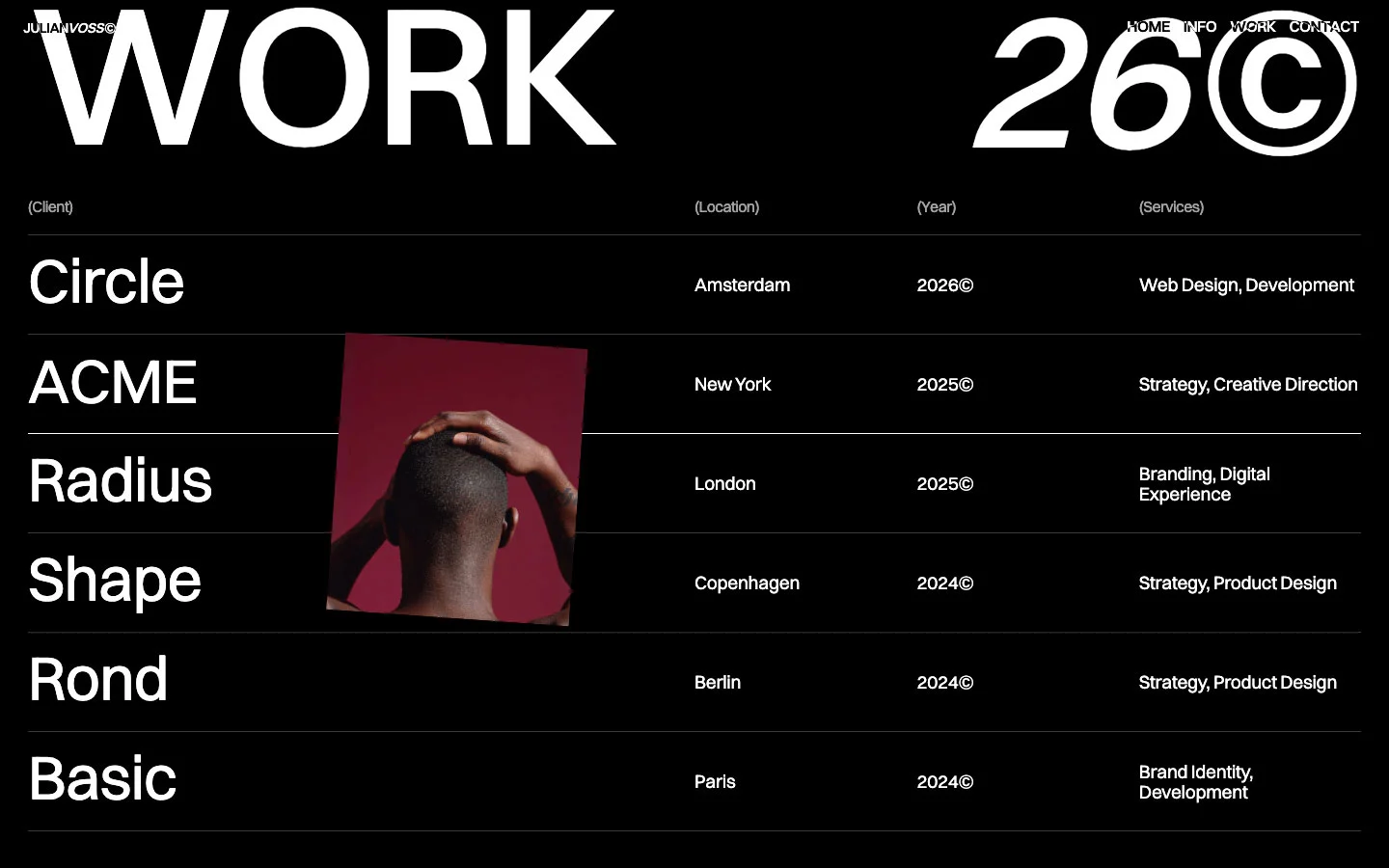
JulianVoss is a black, type-first portfolio for a freelance design director. It opens on a full-screen, red-lit, grainy portrait with the name JULIANVOSS© across the bottom at 14.2vw. The rest of the page is white Switzer on pure black: a huge statement that lights up word by word, a quiet two-column info block, a wall of square photos and a ruled index of projects. Colour only comes from the photos.
Four signatures make it recognisable:
- Upright plus italic name. The hero title is JULIAN upright and VOSS italic in the same Switzer 500 at 204px, uppercase, line height 0.85, tracking −5px, ending in a ©. The small nav logo repeats it (JULIANVOSS© with italic VOSS).
- Difference blending. The fixed nav and the hero title use mix-blend-mode: difference, so white text turns cyan over the red photo and stays white over black.
- The name shrinks into the logo. On scroll, the hero title moves x 0 → −45vw, y → −4vw and scales 1 → 0.07 until it sits top-left as the 14px nav logo.
- Bracket labels and copyright years. Section labels are grey and in brackets, (Info), (Services), (Selected); years carry a ©, 2024©; big titles end in ©, All ©, 26©.
JulianVoss is dark-only, with one white band at the very end.
Colors
Surfaces
#000000Page background (--_color---page-color--first-color: black)
#FFFFFF · 20%Translucent fills on black (6 rendered uses), which read as #333333
#494949The dark grey variable (--_color---page-color--color); declared, not seen rendered
#FFFFFFThe last 900px section: a white band with the black marquee (24 black text uses)
#EBEBEBLight greys in the variables (second colour, blockquote rule)
#F1F1F1Light greys in the variables (second colour, blockquote rule)
Ink
#FFFFFFText on primary
#FFFFFFAlmost all text (713 uses), links and the 1px link underline
#FFFFFFSame as ink: body text is full white
#999999Bracket labels (Info) and the not-yet-revealed words of the scroll statement (38 uses)
#FFFFFF · 70%The third page colour variable, for softer text over photos
#000000Text on inverse-canvas
#FFFFFFHero text over the photo, blended with difference
Action
#000000Set to the canvas: the template has no filled buttons
Lines & effects
#FFFFFF · 20%The 1px rule under each project row (border-bottom: 1px solid #fff3)
#FFFFFF · 20%The one frosted element
Typography
Switzer · display-hero
The quick brown fox jumpsJULIAN + italic VOSS + © (h1). 204px · 500 · 0.85 · -5px
Switzer · headline-statement
The quick brown fox jumpsThe scroll-reveal statement I work with forward thinking brands … experiences built for what's next. 67px · 500 · 1.1 · -0.6px
Switzer · title-lg
The quick brown fox jumpsHero tagline Ideas, design, and direction for ambitious brands. 24px · 500 · 1.1 · -0.6px
Switzer · body-lg
The quick brown fox jumpsServices list and project meta: Copenhagen, 2024©, Strategy, Product Design. 19.2px · 400 · 1.1 · -0.3px
Switzer · label
The quick brown fox jumpsNav HOME INFO WORK CONTACT and link buttons ABOUT (110 uses). 16px · 500 · 1.1 · -0.3px
Switzer · caption
The quick brown fox jumpsHero footer meta FREELANCE DESIGN DIRECTOR, STOCKHOLM 11:13 PM (.text-01). 14.4px · 500 · 1.1
Spacing & shape
| Purpose | Value |
|---|---|
| Container | 100% wide with 2% side padding (28.8px at 1440) |
| Section rhythm | .section is padding: 150px 2%; the first section after the hero uses 250px on top (--_spacing---section--padding-top-bottom) |
| Breakpoints | 991, 767 and 479px |
Spacing scale
| Token | Value | Preview |
|---|---|---|
xs | 10px | |
sm | 20px | |
md | 30px | |
lg | 50px | |
xl | 67px | |
2xl | 120px |
Layout spacing
| Token | Value | Preview |
|---|---|---|
column-gap | 0px | |
gutter | 28.8px | |
section | 150px | |
section-hero | 250px |
Border radius
Motion
| Name to logo | Hero title x 0 → −45vw, y → −4vw, scale 1 → 0.07, scrubbed |
| Link and project roll | Characters y → −101%, power1.out, staggered, 0.33–0.87s; some y → −117% at 0.44–0.52s |
| Nav link roll | y 100% → 0 and y −100% → 0%, 0.5s |
| Underline draw | width 0% → 100%, power1.out, 0.5s |
| Statement reveal | Word colour #999999 → #FFFFFF, ScrollTrigger top center → bottom center |
| Image drift | y 4% → −4% over the viewport, scrub 0.8–1.2; one image y → 20%, 0.9s |
| Fade | opacity 0 → 1, 0.45s |
| Marquee | x 0% → −100%, linear, 50s, looping |
| Intro | expo 2.0s and 1.2s tweens on load; a © that flies off with y 0 → −300vw, rotation 0 → 50°, scale 1 → 100, sine.in 0.9s |
| Small hovers | power2.out, 0.3s |
Do’s and don’ts
- Keep the page #000000 with #FFFFFF text, and use #999999 only for bracket labels and unrevealed words.
- Set display text in Switzer 500 at 14.2vw, line height 0.85, tracking −5px, and end titles with ©.
- Italicise one word of the name, never a sentence.
- Use mix-blend-mode: difference on the fixed nav so it reads over photos and black alike.
- Use square-cornered images in tight grids (10px gap) and a 1px #FFFFFF at 20% rule between list rows.
- Use the underlined uppercase link (.button-link) for every call to action.
- Add filled or outlined buttons, cards or rounded images.
- Use Newsreader or Playfair Display. They are loaded but unused.
- Hard-code the hero's cyan; it is a blend result.
- Add shadows or coloured UI. Colour belongs to the photos.
- Use tracking tighter than −1px below display size, or −5px on anything smaller than 100px.
- Use the white inverse-canvas anywhere but the final marquee band.
- Put #999999 labels on the 20% white surface-1; there it drops below 4.5:1. Keep grey text on pure black.
Example prompt
Any page in the JulianVoss style
More design systems like this
Portfolio design systems, the same colors first.


Bring any of them to your AI tool
All Access unlocks all 398 design systems, ready for Claude, ChatGPT, Gemini, Cursor, v0 and Lovable, plus 400+ templates on all 5 platforms.
Get All AccessUpgrade to All AccessHow to use the JulianVoss design system
Pick a file to see what it’s for and where it goes.
What it is
The whole design system in one markdown file, written for AI: every color, type style, spacing value, component and motion rule, plus do's, don'ts and a ready prompt.
Best for
Claude, ChatGPT, Gemini, Cursor and v0, or any other AI tool that builds pages or code.
How to use it
- Put
DESIGN.mdin your project and mention it in your request, or save it as.cursor/rules/julian.mdc - For the rule file, start it with a front-matter block that sets
alwaysApply: true, so every chat uses it - Ask: “Build a pricing page using DESIGN.md.” Cursor follows the colors, fonts, spacing and rules
- Put
DESIGN.mdin the project root - Add one line to
CLAUDE.md: “Follow DESIGN.md for all UI.” - Ask for any page or component; Claude reads the file first
- Attach
DESIGN.mdto the chat (or paste it in) - Ask: “Build a landing page in this design system.”
- Keep the file in the chat or project knowledge, so follow-up pages stay on style
What it is
Every token as data, in the W3C Design Tokens format: colors with their roles, type styles, radius, spacing, and component tokens that point at them.
Best for
Figma (Tokens Studio), Style Dictionary and other design-token tools, and build scripts.
How to use it
- In Figma, open Tokens Studio, choose Import, and pick
tokens.json - Or point Style Dictionary’s
sourceat it to generate tokens for any platform - In code, import it like any JSON file
What it is
A Tailwind CSS v4 theme: every color, font, type style, radius and spacing value becomes a Tailwind utility, like bg-canvas, text-headline-lg or rounded-md.
Best for
Tailwind v4 projects, and AI builders that write Tailwind (v0, Lovable, Bolt).
How to use it
- Save
theme.cssnext to your main CSS file - Import it after Tailwind:
@import "tailwindcss"; @import "./theme.css"; - Use the classes:
bg-canvas text-ink rounded-md p-lg
What it is
The same tokens as plain CSS variables on :root. Component values point at the color variables, so changing one color updates everything that uses it.
Best for
Any website: plain CSS, Webflow custom code, Framer, WordPress.
How to use it
- Add it to your stylesheet, or in Webflow paste it into Site settings → Custom code inside a
<style>tag - Use the variables anywhere:
color: var(--color-ink) - Change a token once and every place that uses it follows